> ## Documentation Index
> Fetch the complete documentation index at: https://docs.turbodev.ai/llms.txt
> Use this file to discover all available pages before exploring further.
# Delay
> Improve your chat flows by adding controlled pauses between messages using the Delay Card. This helps create more natural interactions and gives users enough time to respond before the next step continues.
### Overview
In some scenarios, you may not want to send the next message immediately after the previous one. Instead of responding within seconds, you might want to wait for a few minutes or even hours before proceeding.
The **Delay Card** allows you to pause a chat flow for a defined duration before triggering the next action.
### Delay Card
With the Delay Card, you can configure a waiting period in:
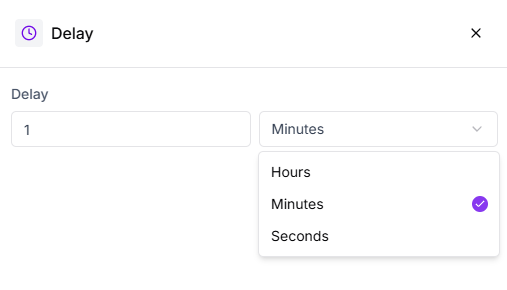 * Seconds
* Minutes
* Hours
This is especially useful when customers need time to complete an action, such as uploading a document, reviewing information, or responding later.
### Using Delay in a Chat Flow
For example, if you ask a customer to upload a document or share details, adding a Delay Card after the request ensures the flow doesn’t move forward too quickly. This keeps the conversation aligned with the customer’s pace.
### Flow Continuation
After the delay duration ends, the chat flow continues based on the configured path. You can define how the flow behaves:
* Seconds
* Minutes
* Hours
This is especially useful when customers need time to complete an action, such as uploading a document, reviewing information, or responding later.
### Using Delay in a Chat Flow
For example, if you ask a customer to upload a document or share details, adding a Delay Card after the request ensures the flow doesn’t move forward too quickly. This keeps the conversation aligned with the customer’s pace.
### Flow Continuation
After the delay duration ends, the chat flow continues based on the configured path. You can define how the flow behaves:
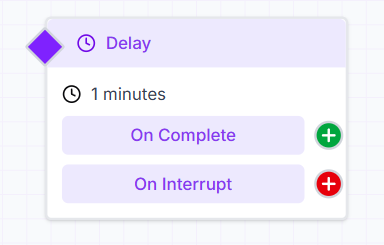 * When the delay completes successfully
* When the flow is interrupted during the waiting period
This flexibility allows you to design smooth, well-timed conversational experiences.
### Best Practice
Use the Delay Card thoughtfully to balance automation and user comfort. Well-placed delays help maintain context, reduce message overload, and improve overall engagement within your chat flows.
* When the delay completes successfully
* When the flow is interrupted during the waiting period
This flexibility allows you to design smooth, well-timed conversational experiences.
### Best Practice
Use the Delay Card thoughtfully to balance automation and user comfort. Well-placed delays help maintain context, reduce message overload, and improve overall engagement within your chat flows.