> ## Documentation Index
> Fetch the complete documentation index at: https://docs.turbodev.ai/llms.txt
> Use this file to discover all available pages before exploring further.
# Broadcast Analytics and Report
> Unlock valuable insights into your broadcast campaigns with TurboDev’s Broadcast Analytics and Reports. Track performance, download reports, and easily repeat successful broadcasts to improve future campaigns.
## Overall Broadcast Analytics
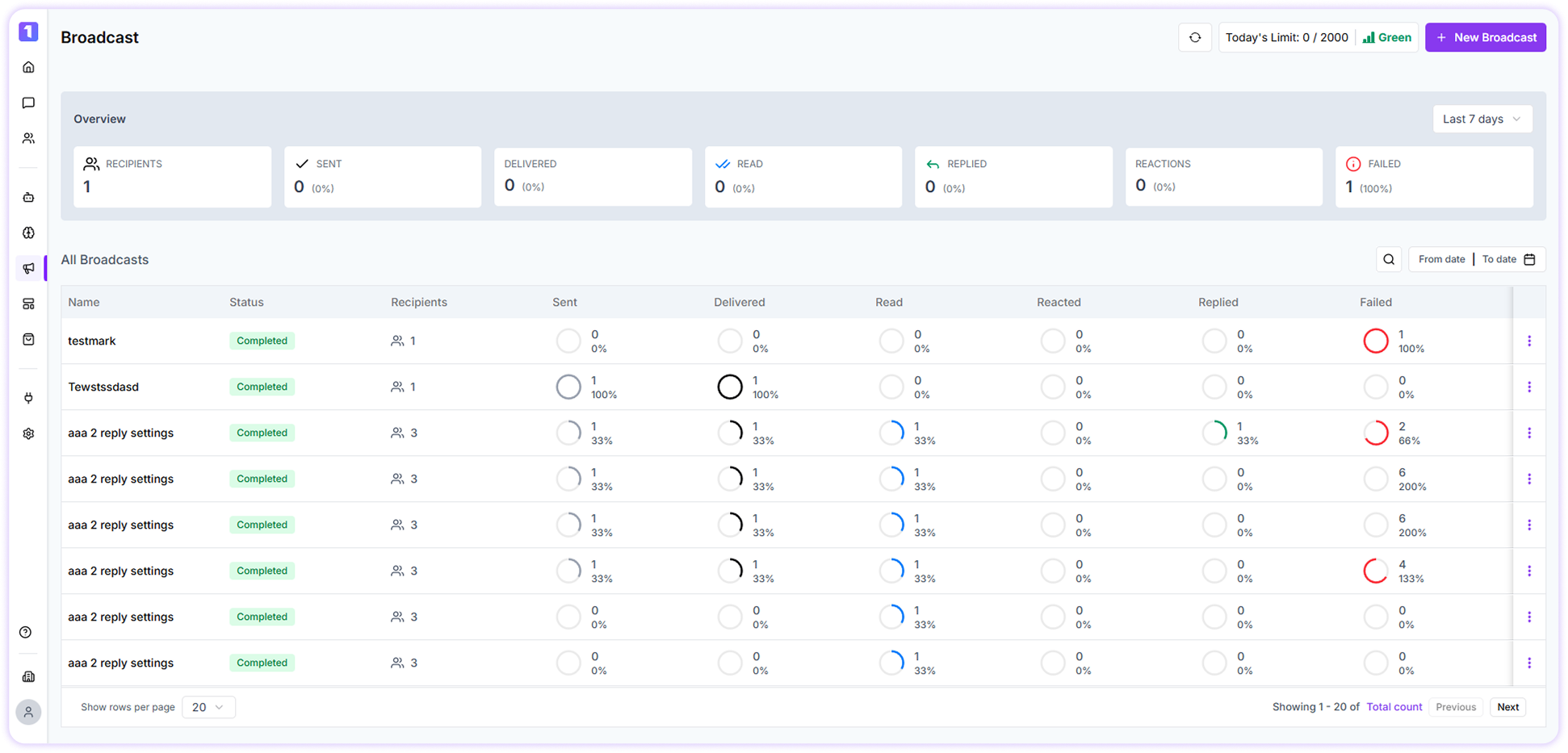
Once a broadcast is scheduled, you’ll be redirected to the **Broadcast Overview** page. This dashboard gives you a consolidated view of all your broadcast campaigns and their performance.
You can:
* Monitor the status of multiple broadcasts in one place
* Analyze how each campaign is performing over time
 ## Date & Status Filters
Use built-in filters to narrow down broadcast data:
* View performance for the last **7, 30, or 90 days**
* Filter broadcasts by status such as **Pending**, **Cancelled**, or **Completed**
This helps you quickly evaluate recent campaigns or review historical performance.
## Repeat Broadcast
If you want to resend a broadcast to the **same contact group**, TurboDev makes it easy.
* Click on the **three-dot menu** next to a broadcast
* Select the option to repeat
* Update the broadcast settings and schedule it again
This is useful for reminders, follow-ups, or recurring campaigns.
## Date & Status Filters
Use built-in filters to narrow down broadcast data:
* View performance for the last **7, 30, or 90 days**
* Filter broadcasts by status such as **Pending**, **Cancelled**, or **Completed**
This helps you quickly evaluate recent campaigns or review historical performance.
## Repeat Broadcast
If you want to resend a broadcast to the **same contact group**, TurboDev makes it easy.
* Click on the **three-dot menu** next to a broadcast
* Select the option to repeat
* Update the broadcast settings and schedule it again
This is useful for reminders, follow-ups, or recurring campaigns.
 ## Broadcast Report
To download a detailed broadcast report:
* Click on the desired broadcast from the dashboard
* Open the broadcast overview
* Click **Download Report**
The report will appear under **Active Exports**, from where you can download the file.
## Broadcast Analytics
To view in-depth analytics:
* Click on any broadcast listed in the dashboard
You’ll be able to see metrics such as:
* Number of messages **delivered**
* How many users **viewed** the message
* How many **responded**
* URL **clicks**
* User **reactions**
* **Unsubscribes** from marketing messages
These insights help you understand customer behavior and refine your broadcast strategy.
## Broadcast Report
To download a detailed broadcast report:
* Click on the desired broadcast from the dashboard
* Open the broadcast overview
* Click **Download Report**
The report will appear under **Active Exports**, from where you can download the file.
## Broadcast Analytics
To view in-depth analytics:
* Click on any broadcast listed in the dashboard
You’ll be able to see metrics such as:
* Number of messages **delivered**
* How many users **viewed** the message
* How many **responded**
* URL **clicks**
* User **reactions**
* **Unsubscribes** from marketing messages
These insights help you understand customer behavior and refine your broadcast strategy.