

Overview
The Condition Card allows you to evaluate data stored in variables and route the conversation accordingly. Based on the outcome, the flow continues through one of two paths:- On Success – when the condition is met
- On Interrupt – when the condition is not met
Setting Up the Condition Block
Adding the Condition Card
The Condition Card is built using four key elements: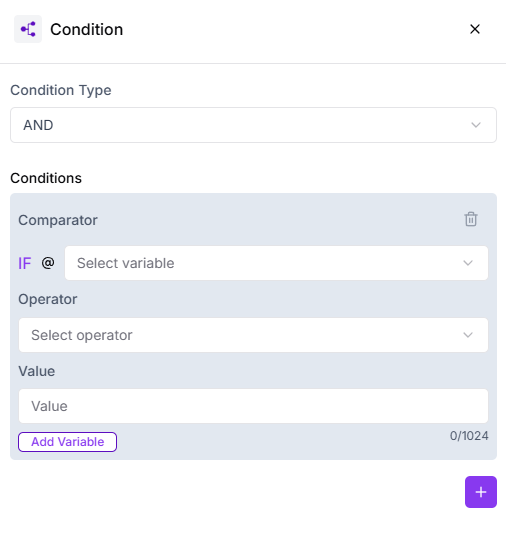
- Comparator (Variable) – the variable that holds the user’s response
- Operator – defines how the value should be compared
- Value – the data you want to validate against
- Logic (AND / OR) – used when multiple conditions are added
Comparator (Variable)
Select the variable that contains the customer’s input or stored information. This is the data Turbodev will evaluate to decide the flow direction.Operator
Choose the rule that should be applied to the variable, such as equals, contains, greater than, or less than.Value
Enter the value that the variable should be compared against. The condition will check whether the variable meets this requirement.Enter the value that the variable should be compared against. The condition will check whether the variable meets this requirement.Using AND / OR Logic
When working with multiple conditions:- AND ensures all conditions must be satisfied
- OR allows the flow to proceed if any one condition is met
Flow Outcomes
Once the condition is evaluated, the chat flow continues through: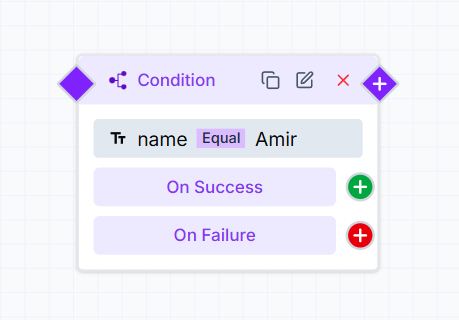
- On Success – when the condition logic returns true
- On Interrupt – when the condition logic fails